Relief Mapping (ピクセルシェーダによる単純なレイトレーシング)
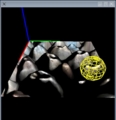
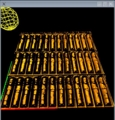
数年前, 学生の頃にOpenGL2.0とNVidia Cgで実装したRelief Mappingの画像です.
このような長方形のポリゴンの上に

- ピクセルシェーダで単純なレイトレーシングを行って, ポリゴン上に幾何形状をリアルタイムに描画します.
- 今回のリリーフマッピング用に使用したテクスチャデータは ディフューズアルベドテクスチャ(RGB), 法線マップテクスチャ(RGB), ハイトマップテクスチャ(R)です.




- 実装の際に参考にした記事は, ShaderX4の"Rendering Surface Detials in Games with Relief Mapping Using a Minimally Invasive Approach"です.
一応,ソースコードも貼り付けておきます.
// 頂点シェーダ (NVidia Cg)
struct VertexInput
 {
       float4 position : POSITION;
       float2 texcoord : TEXCOORD0;
 };

 struct VertexOutput
 {
       float4 position : POSITION;
       float2 texcoord : TEXCOORD0;
       float3 object_position : TEXCOORD1;
       float4 color : COLOR;
 };

 VertexOutput main(VertexInput vertex_input,
                 uniform float4 color)
 {
       VertexOutput vertex_output;

       // position
       vertex_output.position = mul(glstate.matrix.mvp, vertex_input.position);

       // object_position
       vertex_output.object_position = vertex_input.position.xyz;

       // texcoord
       vertex_output.texcoord = vertex_input.texcoord;

       return vertex_output;
 }
フラグメントシェーダ (NVidia Cg)
struct FragmentInput
{
float2 texcoord : TEXCOORD0;
float3 object_position : TEXCOORD1;
float4 color : COLOR;
};
struct FragmentOutput
{
float4 color : COLOR;
};
#define RELIEF_LINEAR_SEARCH_STEP 10
#define RELIEF_BINARY_SEARCH_STEP 6
void rayIntersectLinear(sampler2D relief_texture, inout float3 tex_vec,
inout float3 eye_vec)
{
eye_vec /= RELIEF_LINEAR_SEARCH_STEP;
for (int i = 0; i < RELIEF_LINEAR_SEARCH_STEP - 1; i++)
{
float4 relief_vec4 = tex2D(relief_texture, tex_vec.xy);
if ( tex_vec.z < relief_vec4.w)
tex_vec += eye_vec;
}
}
void rayIntersectBinary(sampler2D relief_texture,
inout float3 tex_vec, inout float3 eye_vec)
{
for (int i = 0; i < RELIEF_BINARY_SEARCH_STEP; i++)
{
eye_vec *= 0.5;
float4 relief_vec4 = tex2D(relief_texture, tex_vec.xy);
if ( tex_vec.z < relief_vec4.w)
tex_vec += 2 * eye_vec;
tex_vec -= eye_vec;
}
}
FragmentOutput main(FragmentInput fragment_input,
uniform float3 eye_position,
uniform float3 tbn_tangent,
uniform float3 tbn_binormal,
uniform float3 tbn_normal,
uniform float object_x_unit,
uniform float object_y_unit,
uniform float relief_depth,
uniform float tile_scale,
uniform float use_texture,
uniform sampler2D texture,
uniform float use_relief_texture,
uniform sampler2D relief_texture)
{
FragmentOutput fragment_output;
fragment_output.color = float4(1, 1, 1, 1);
float3 object_position_eye_vec = fragment_input.object_position - eye_position;
float3 n_object_position_eye_vec = normalize(object_position_eye_vec);
float cos_z_object_position_eye = dot(- n_object_position_eye_vec, tbn_normal);
// eye_vec in TBN space
float3 n_eye_tbn_vec = normalize( float3( dot(n_object_position_eye_vec, tbn_tangent),
dot(n_object_position_eye_vec, tbn_binormal),
cos_z_object_position_eye) );
// scale depth
float3 scale = float3(object_x_unit, object_y_unit, relief_depth) / tile_scale;
n_eye_tbn_vec *= scale.z / (scale * n_eye_tbn_vec.z);
// search tex_vec by raycast
float3 tex_vec = float3(fragment_input.texcoord * tile_scale, 0);
rayIntersectLinear(relief_texture, tex_vec, n_eye_tbn_vec);
rayIntersectBinary(relief_texture, tex_vec, n_eye_tbn_vec);
// expand normal to object_space
float3 object_normal = tex2D(relief_texture, tex_vec.xy).xyz - 0.5;
object_normal = normalize(object_normal.x * tbn_tangent.xyz +
object_normal.y * tbn_binormal.xyz +
object_normal.z * tbn_normal.xyz);
float3 new_object_position = fragment_input.object_position +
n_object_position_eye_vec * tex_vec.z * relief_depth / cos_z_object_position_eye;
// color
fragment_output.color = tex2D(texture, tex_vec.xy);
// diffuse, specular
float4 diffuse_sum = float4(0, 0, 0, 0);
float4 specular_sum = float4(0, 0, 0, 0);
for (int i = 0; i < LIGHT_NUM; i++)
{
float4 tmp_diffuse;
float4 tmp_specular;
computeLight(glstate.light[i].position, glstate.light[i].diffuse,
glstate.light[i].specular,
new_object_position, object_normal, eye_position,
1.0,
tmp_diffuse, tmp_specular);
diffuse_sum += tmp_diffuse;
specular_sum += tmp_specular;
diffuse_sum = saturate(diffuse_sum);
specular_sum = saturate(specular_sum);
}
fragment_output.color *= (diffuse_sum + specular_sum);
return fragment_output;
}
